
Setup in three steps
Your WoW copy, your companions, then a summary. RealmBox checks Docker and available disk space before allowing the download.
World of Warcraft · entirely local
RealmBox turns your compatible World of Warcraft copy into a local solo adventure: AzerothCore runs the world, Playerbots populate it, and the launcher handles the entire setup.
Check GitHub for installer and SHA-256 availability. Windows remains experimental; the full 0.5.0 gameplay path still needs qualification on both platforms.
What’s new · 0.5.0 preview
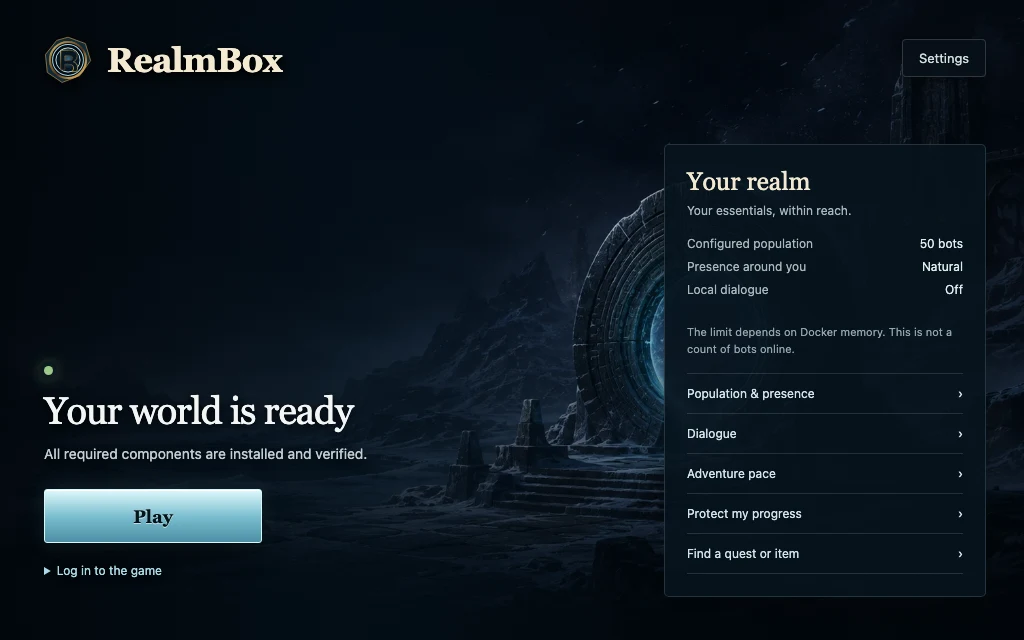
A home screen with realm shortcuts and new tools for your solo adventure. These views show version 0.5.0; check the preview release for installer availability.
Your WoW copy, your companions, then a summary. RealmBox checks Docker and available disk space before allowing the download.
Normal, Comfortable, or Accelerated: inspect the values before applying them with the world stopped. Previous rules can be restored; enemy difficulty stays the same.
The Local guide finds up to eight results by name in your world’s catalogue, with their source. No AI or external service, and no access to your character.
Three five-player squad presets, an observed primary companion, and a preview of party or target commands. Recalling the same bots by name is not guaranteed.
Create a complete, verified backup from Protection. Copies stay on your computer, outside the replaceable installation, without overwriting earlier backups.
Direct, Immersive, or Lively: adjust conversations independently from population. The new failure-recovery patch depends on server images rebuilt for 0.5.0.
WoW without server administration
No command line, no database configuration, and no public server to maintain.
AzerothCore, MySQL, and the game services are installed inside a local Docker environment.
Playerbots adds autonomous adventurers and lets you form a balanced party of companions.
RealmBox starts WoW and every service in the right order, then stops them when the client closes.
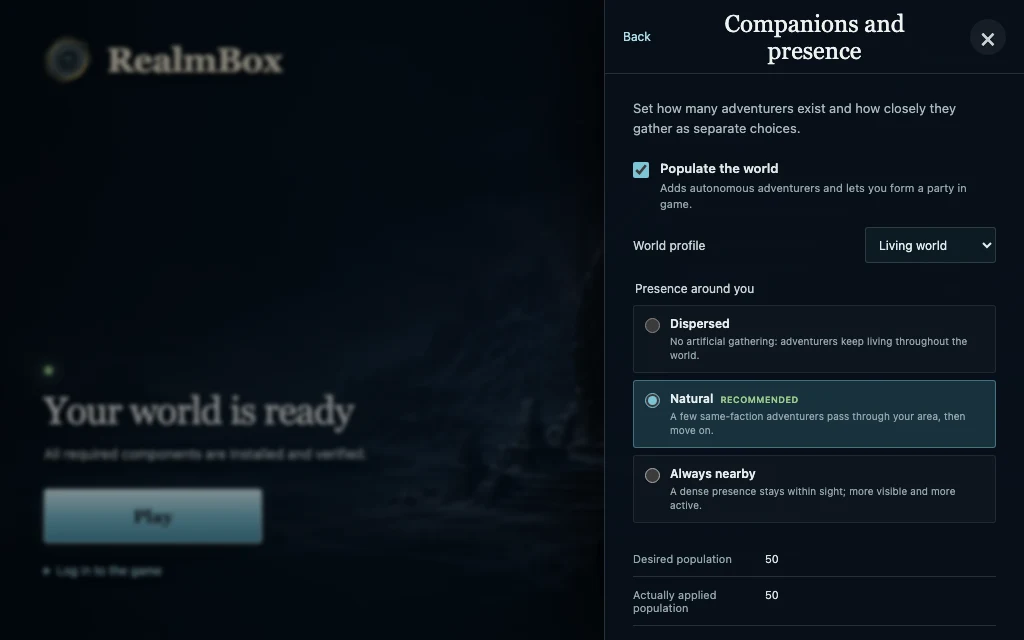
Built-in Playerbots
Meet bots in the world, form a party of four companions, and direct them through the RealmBox addon inside WoW.
Guided installation
Prepare Docker Desktop and your compatible WoW copy, then follow the 0.5.0 setup assistant. Installers appear on the preview release page when available.
Start Docker Desktop and keep it running. RealmBox installs AzerothCore, the local database, and Playerbots inside it.
RealmBox needs the Data folder from a compatible client. Open the ChromieCraft page in your preferred language, then choose the corresponding client or language pack offered there.
Check the preview assets for the Apple Silicon Mac DMG or experimental Windows x64 installer. Wait until both the installer and SHA256SUMS.txt are available, then compare the SHA-256 checksum.
In the assistant, select the game folder or Data, then choose population, presence, and optional dialogue. Game files are checked before you continue.
Review Your installation and resolve Docker or disk warnings. Click Install after the checks pass, then Play when your world is ready.
Under the hood
RealmBox is a Tauri and React desktop application. It orchestrates free-software components pinned to immutable versions while keeping server details out of the player flow.
maps, vmaps, mmaps, and dbc are produced from your own Data folder.
Game ports stay bound to 127.0.0.1 and MySQL is not exposed on the host.
Complete, verified backups before migrations and on demand in Protection. If a required backup is missing, the operation stops.
Ollama and a small local model can power bot replies without cloud access during play. The CanIRun compatibility check sends only CPU, core count, and memory information.
Your data stays with you
RealmBox creates no remote account and sends no game files. Your world, characters, backups, and logs stay on your computer.
Frequently asked questions
The preview release page is public. Check its assets for installer and SHA256SUMS.txt availability. Full macOS and Windows gameplay paths still need qualification for this version; Windows is experimental. Distribution signing and notarization are not provided.
Yes. With the world stopped, you can restore the previous rules. This does not remove experience, money, or professions already gained, and does not change enemy difficulty.
No. It only searches quest and item names in local references. It reads neither your quest log nor your inventory and generates no AI advice.
RealmBox uses the files from a compatible World of Warcraft: Wrath of the Lich King copy and starts a local Azeroth through AzerothCore. RealmBox contains and distributes no proprietary game files.
RealmBox does not connect to official servers and needs no subscription for its local operation. You must still use a game copy you are authorized to own.
Playerbots populates Azeroth with autonomous characters. The RealmBox addon can also gather four bots near you to form a playable party.
Use the French or English page for your preferred language. RealmBox then detects the locale actually present in the selected Data folder. On Apple Silicon Macs, it reuses that data with OpenWoW instead of running the Windows Wow.exe.
No. The selected folder is checked and used read-only during extraction. RealmBox-managed files live in its own local directory.