Choose your style
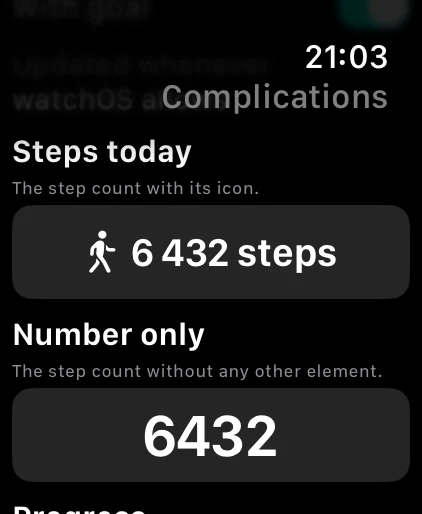
Six built-in styles show steps in circular, corner, inline or rectangular shapes.
 Pas du Jour
Pas du Jour watchOS
Your steps on your watch face. Six free styles, a seven-day chart and a guide to add your complication. Optional one-time Pro creator.
Purchase options and compatibility are detailed in the App Store listing and in the app.
What it does Pas du Jour
Six built-in styles show steps in circular, corner, inline or rectangular shapes.
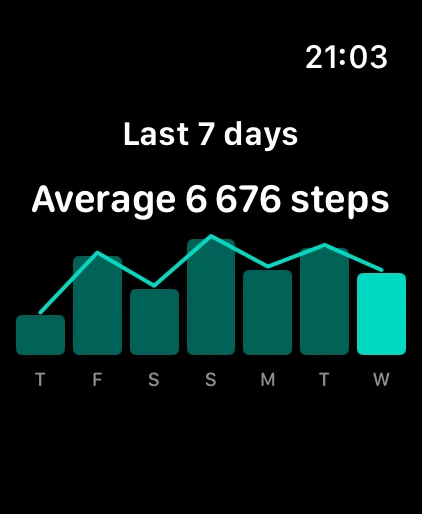
See the last seven days and their average in a compact chart.
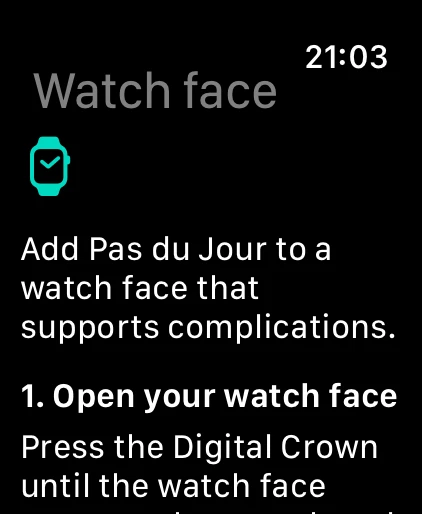
Follow four steps before Health setup, from the app, or after saving a style. Available slots depend on the watch face.
Six built-in styles put today’s step count on your Apple Watch face, in whichever shape that face asks for — circular, corner, inline or rectangular. Nothing to open, no sign-in, no iPhone screen to check: the number is already where you look.
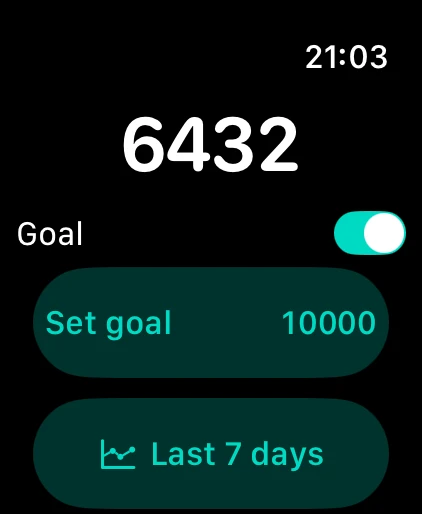
INCLUDED, WITH NO LIMIT • Follow the installation guide from onboarding or the home screen. • Check your total at a glance. • See your last seven civil days as a compact chart with a daily average. • Set a daily goal and follow your progress. • Pick one of six built-in styles: steps today, number only, progress, steps + goal, steps remaining, levels. • Choose circular, corner, inline, or rectangular complication layouts on compatible watch faces.
PAS DU JOUR PRO — ONE-TIME PURCHASE • The style creator: up to eight profiles, with the data, layout, and icon you choose. • Streak: consecutive days you reached your goal. A day Health has no reading for never breaks it. • Left this week: the steps still needed to reach seven times your daily goal. One purchase, kept for good: no subscription, no account. You can build and preview a style freely before deciding. And if you were already using Pas du Jour before version 1.1.0, the style creator stays yours at no cost.
With your permission, the app reads today’s steps and up to fourteen days of history from Health, in the app and in the complication. Your streak and what is left of your week are worked out on your watch, never anywhere else. Your counts, goal, and bounded app cache stay on your device. Pas du Jour has no account, ads, analytics, or server.
Data may refresh periodically depending on watchOS and Health availability. Pas du Jour is not a medical device and does not provide medical advice or diagnosis.
What it does
Start with a watch face that has a compatible slot. Pas du Jour supports circular, corner, inline and rectangular formats; the available shape depends on the face.
The app offers a preview and an on-watch guide. You add the complication in the watchOS face editor; the app cannot install it for you.

More independent apps
Support
Describe your question or the issue you encountered. Your message will be sent to support through Formspree.

